 Reclaim

Xcode and simulators
Derived data, device support for iOS versions you no longer run, archives, and simulator devices nobody has booted in weeks.
DerivedDataSimulatorsDevice supportSwiftPM
Reclaim knows where Xcode, Docker, node_modules, agents and models keep their copies, explains each one, and checks again before anything goes.
Reclaim runs on macOS 15 or later. Open reclaim.alovelylight.com on your Mac to download it, or email yourself the link.
Launch offer $20 instead of the usual $29
14 days, everything includedmacOS 15 or laterApple silicon and IntelNo account
A developer’s Mac, 245 GB and 97% full. A general cleaner sees one cache folder here. Reclaim sees the tools that made each of these. Seven of the nine are places no other cleaner looks; the two others find are marked.
Every build, simulator, container, agent session and model download leaves something behind. Each is a known place with a known cost, and Reclaim has a rule for it.
Derived data, device support for iOS versions you no longer run, archives, and simulator devices nobody has booted in weeks.
node_modules in projects you have not opened in months, package caches, and every browser build Playwright and Puppeteer downloaded.
Docker images no container uses, build cache, stopped containers, and virtual machine disks that grew and never shrank.
Claude Code and Codex transcripts, sessions and old binaries, the sandbox VM, and the worktrees agents leave behind when they finish.
The caches of pip, uv, conda and pyenv, the Hugging Face hub and whisper weights. Ollama models are shown with the command to remove them, for you to run.
Figma and Adobe media caches, Lightroom previews, Final Cut generated files, Logic bounces, and Blender versions side by side.


Three steps, and you decide at every one of them.
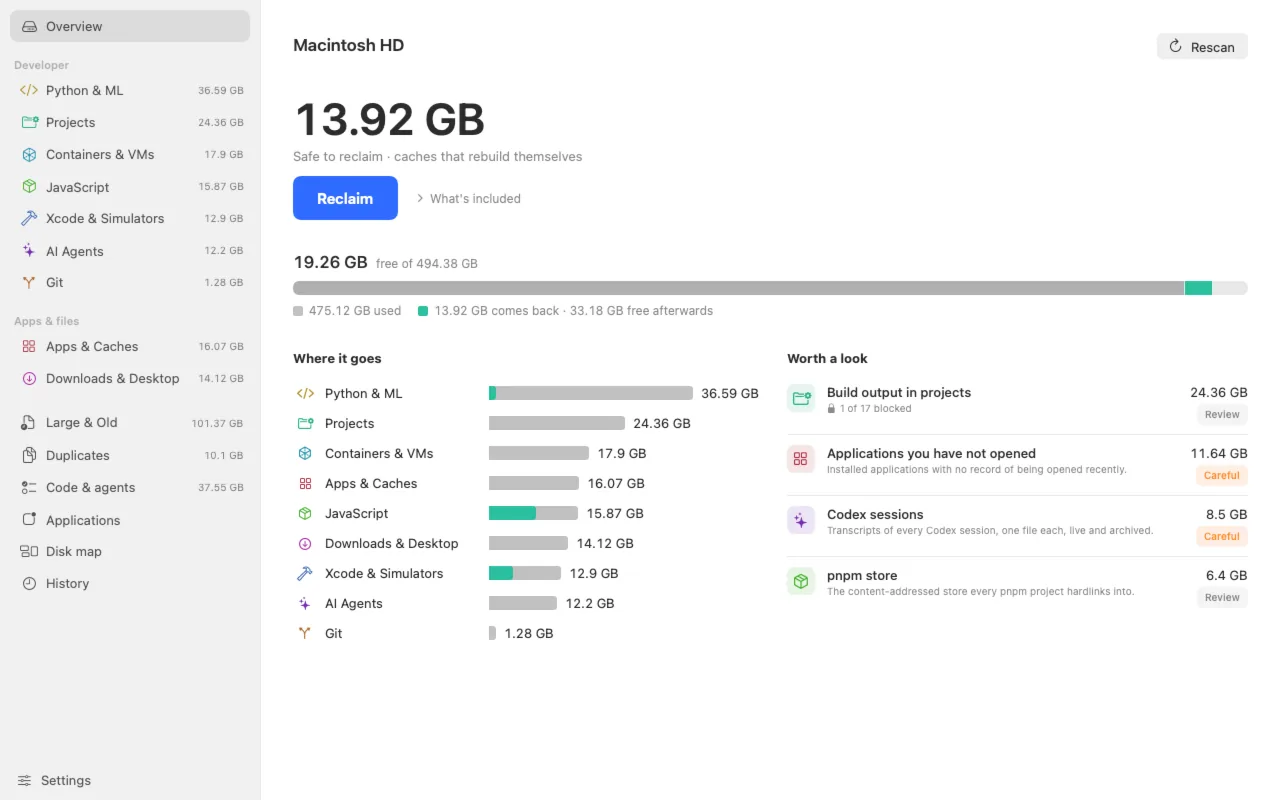
Open Reclaim and the first results land in under two seconds. A full pass over a home folder of 1.8 million files takes about seventeen. Nothing is removed by scanning, and the scan stays free after the trial.
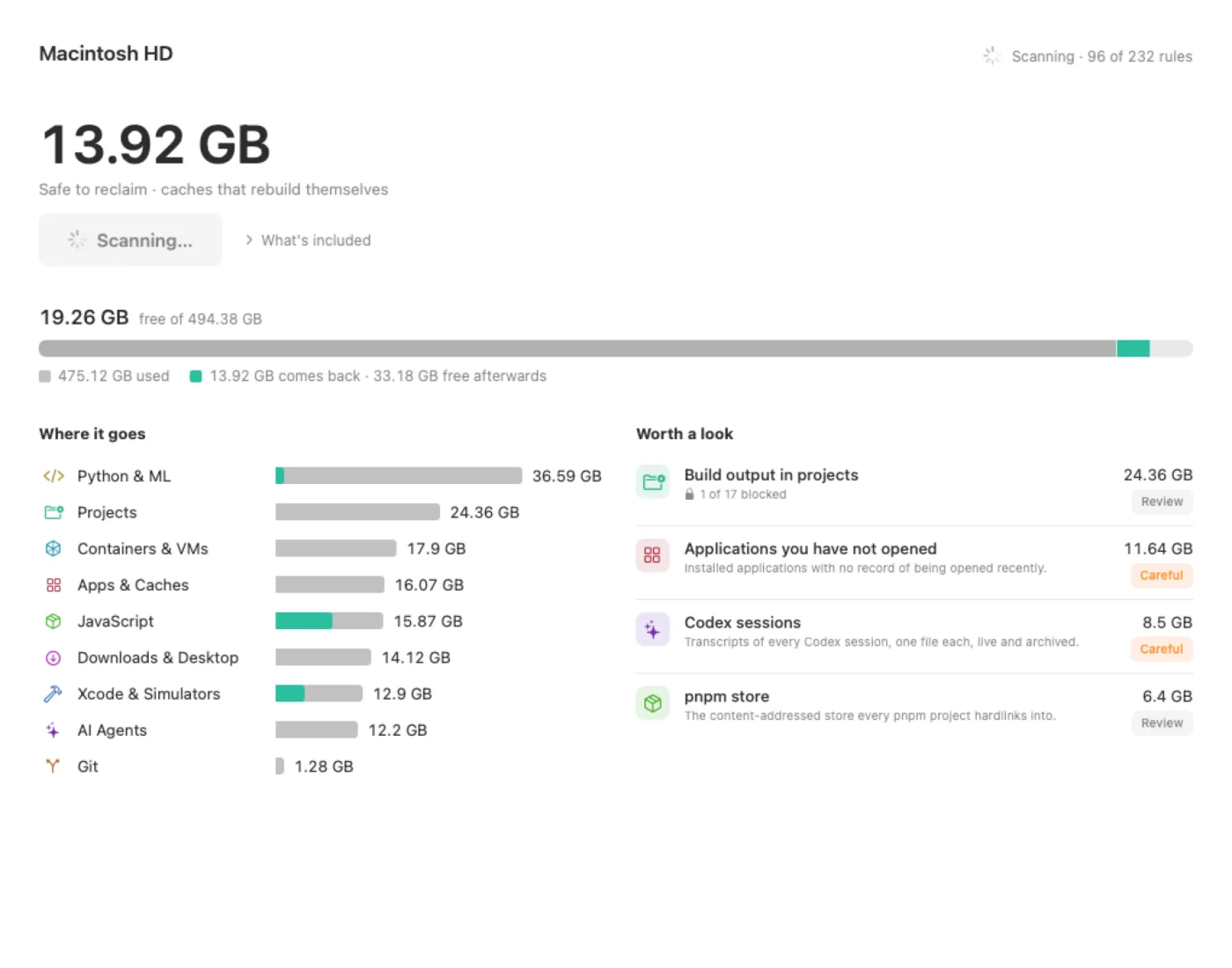
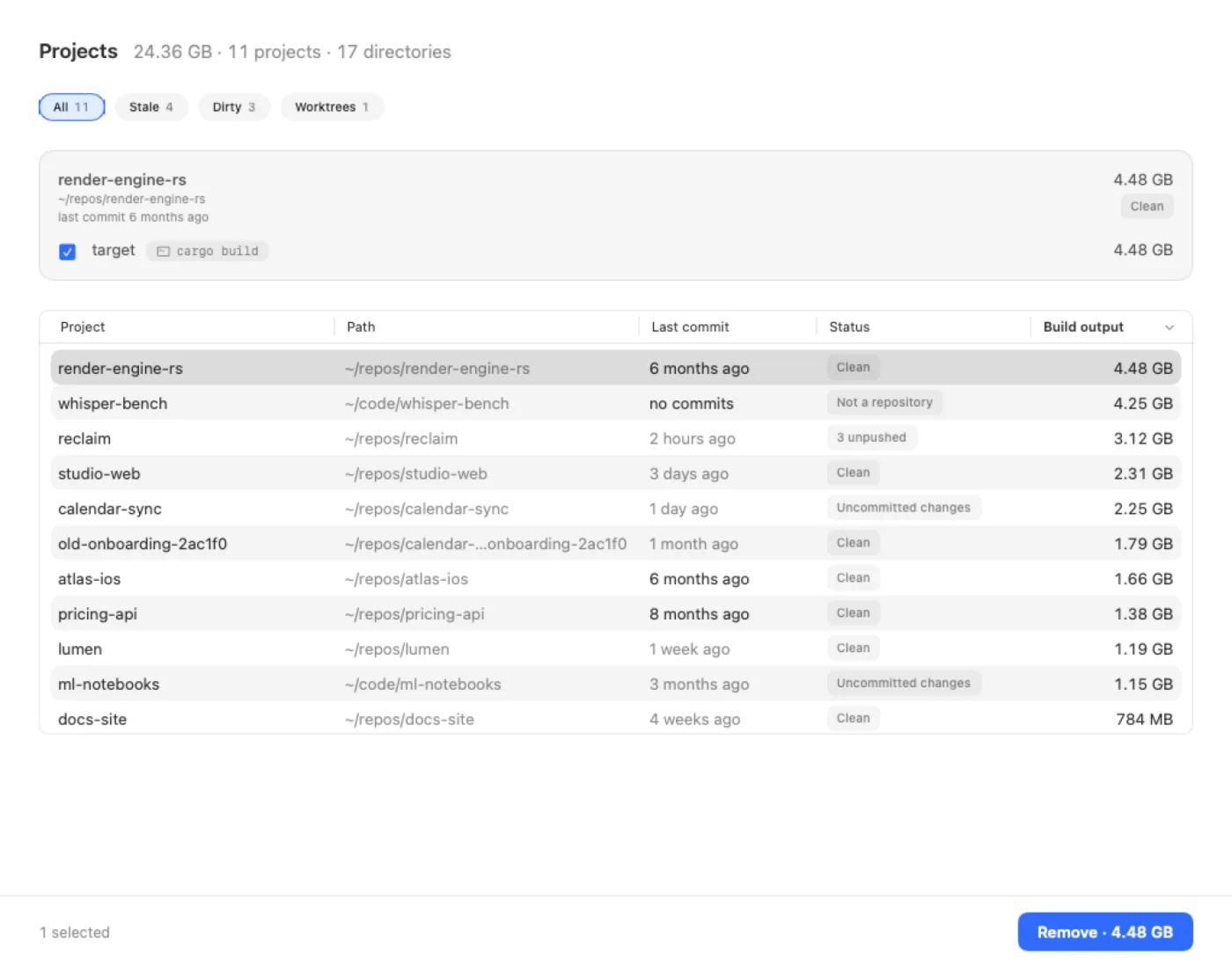
Each finding says what it is, why it grew, what happens after removal and how to keep it small, with a picture that fits the kind of thing it is. Projects are listed with their build output, and the disk map shows everything no rule knows.
One click removes the caches that rebuild themselves. Anything with a cost, a download, a rebuild or a new sign-in, waits in a sheet that names that cost, the checks that passed, and your free space afterwards.
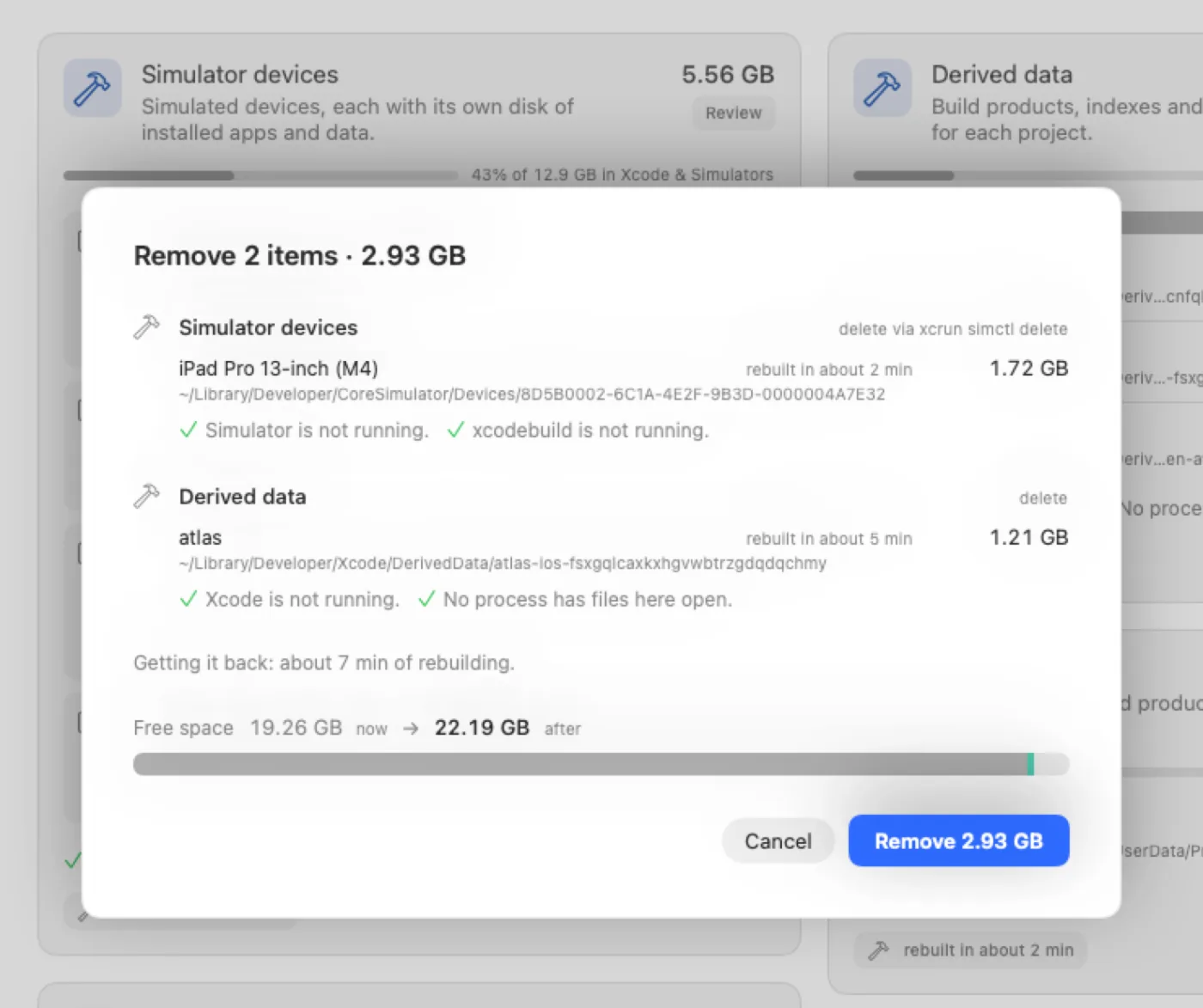
A scan can be an hour old. In that hour an agent can start work in a worktree, or an app can open its cache. So right before each item goes, Reclaim reads the running processes again and asks git again. If anything changed, the item stays, and the reason is written next to it.
If any process has a file open inside it, or is running from it, the item stays, and the process is named.
A shell, editor, agent or language runtime working inside the folder blocks its removal. Build output is judged by its whole project.
Uncommitted changes and unpushed commits are asked of git again. A worktree holding work is copied to ~/Reclaim Exports first, as a patch or a git bundle; if the copy fails, the worktree stays.
Anything that may hold work you made, from screenshots and downloads to transcripts and worktrees, moves to the Trash, where you can put it back.
A folder chosen for its age is checked again: if something inside was written since, it is in use again, and it stays.
Keychains, Mail, Messages, Photos, iCloud Drive, ~/.ssh and the system’s own folders are refused, whatever a rule says.
Each removal is logged before it starts, and nothing is removed if the log cannot be written. History shows what went, when and under which rule, with Show in Trash.
Where a cleanup belongs to the tool that made it, Reclaim shows the command for you to run, and never runs it on its own.

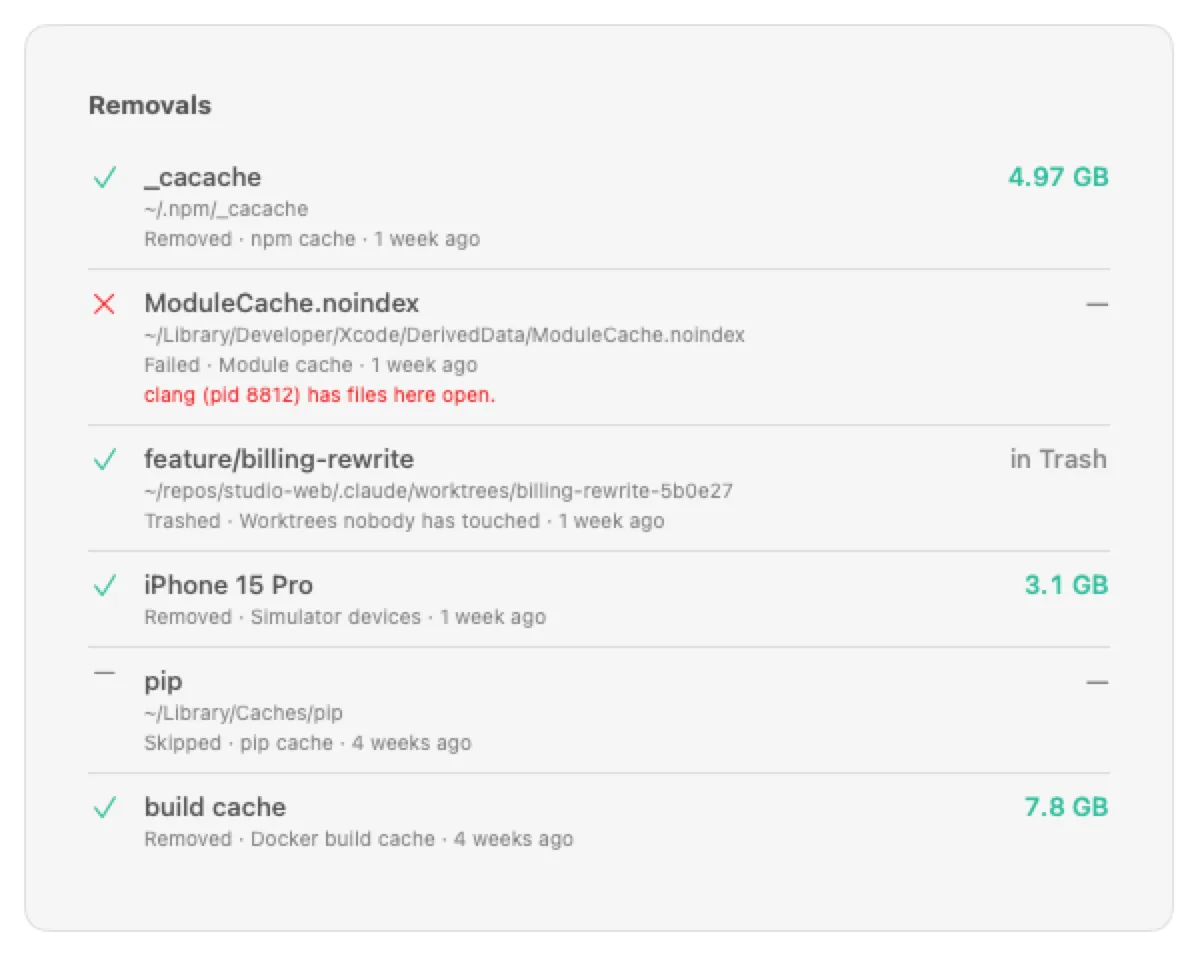
These checks lower the risk; they cannot remove it. Tools change where they keep things, so every finding shows its reasons before you confirm, and the license agreement says the same in plain words.
Every part of the app works on your Mac, explains itself, and leaves the decision with you.
The whole home folder as a map, so the gigabytes no rule knows about are still in plain sight.

Every repository with its build output and dependencies. Output goes only when the project’s own .gitignore says it is disposable.
Each scan is kept as a compact snapshot, so you can see what filled 20 GB since last week, rule by rule. An optional weekly scan tells you when the reclaimable part passes a threshold you set.
Sets of identical files with the filed copy kept, and big files nobody has opened in months. Both go to the Trash, chosen row by row.
Every installed app by size and when you last opened it, with Uninstall, and the leftovers of apps already gone.
Each finding ends with the setting or command that stops it growing back, for the tool that made it.
Installers for apps already installed, archives already unpacked, and screenshots piling up on the Desktop, each listed so you choose.
Without Full Disk Access, Reclaim still scans what it can see, and says plainly which places it could not look into.
Download the trial and scan. Everything is included for 14 days, and scanning stays free after that.
Reclaim runs on macOS 15 or later. Open reclaim.alovelylight.com on your Mac to download it, or email yourself the link.
Every rule Reclaim applies is published under the MIT license, as one JSON file and as a page per rule: what the tool keeps there, why it grows, and what removing it costs.
npx playwright uninstall --all before an upgrade starts from empty.No subscription, no account. Try everything for 14 days, then buy once.
The app plus one year of updates. The launch price is applied at checkout.
Sold through Paddle, the merchant of record, which handles payment and tax. Prices in USD before tax.
Everything is included for 14 days. After that, scanning, the overview, Projects, every explanation and every keep-it-small command stay free. The Reclaim button and batch removal need a license.
After the first year, updates are optional. $15 extends them by a year from the day they would have ended, so renewing early costs nothing extra.
macOS 15 or later, on Apple silicon or Intel. Reclaim asks for Full Disk Access so it can see caches inside Library.
Scanning runs on your Mac. No path, file name or size is sent anywhere, and this website sets no cookies of its own and runs no analytics.
Crash reports are off until you turn them on, and every path, file name and size is scrubbed before sending. The update check can be turned off.
The key is checked on your Mac with a public key built into the app. Paddle handles payment; we receive your email address and an order number. The privacy policy has the details.
Download the app and open it. Everything is included for 14 days, with no account and no card. After the trial, scanning, the overview, Projects, every explanation and every keep-it-small command stay free; the Reclaim button and batch removal need a license.
The app plus one year of updates, on up to three Macs you own or control, for personal or business use. Every version released during that year keeps working after it, for as long as you like.
Nothing stops working. If you want the versions released later, $15 extends updates by a year from the day they would have ended, so renewing early costs nothing extra.
Yes, $9 off the license during the launch period: $20 instead of $29. It is applied automatically when you open the checkout from this page.
By email, right after checkout. Payment goes through Paddle, the merchant of record, which handles payment and tax. Paste the key into Reclaim and it is verified on your Mac; there is nothing to sign in to.
Yes. If Reclaim does not work for you, write within 14 days of purchase and you get a full refund, with no questions asked.
No analytics, ever. The app checks for updates, which you can turn off. Crash reports and asking GitHub which of your pull requests are merged are both off unless you turn them on, and crash reports are scrubbed of every path, file name and size before they are sent.
macOS 15 or later, on a Mac with Apple silicon or Intel. Reclaim asks for Full Disk Access so it can see caches inside Library; without it, it can still scan and shows which results are limited.
App Store apps run in a sandbox, and from inside it Reclaim could not see which processes have files open or which sessions are working in a project, the checks it makes before every removal. So it is sold here, signed with a Developer ID and notarized by Apple.
Anything that went to the Trash can be put back until the Trash is emptied, by you or by Finder, which empties items after 30 days if “Remove items from the Trash after 30 days” is on in its settings. History has Show in Trash for each one. Caches that were removed outright are rebuilt by their tool the next time it needs them, and each finding says what that costs: a download, a rebuild or a sign-in.
Scan for free. Keep the space with one purchase.
Reclaim runs on macOS 15 or later. Open reclaim.alovelylight.com on your Mac to download it, or email yourself the link.
14 days, everything included14-day refundmacOS 15 or laterApple silicon and Intel